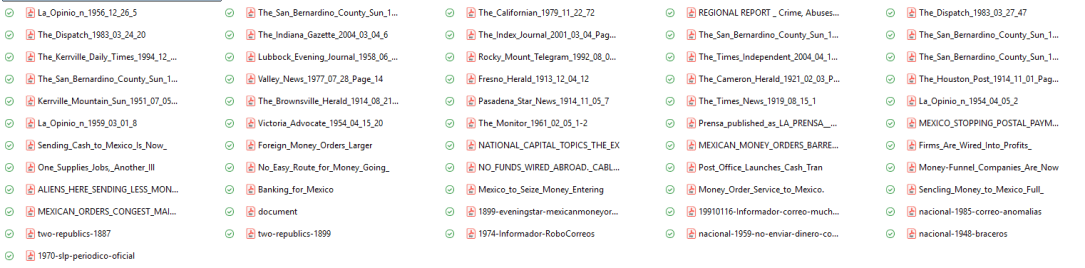
I have saved dozens of PDFs of historical newspaper sources in a dread-inducing folder! My non-AI approach to build order from digital primary source chaos

Do you also have messy folder of PDFs that you need but can’t bring yourself to deal with?

I first worked with digitized historical newspaper databases as a PhD student in the 2010s, and I immediately loved the satisfaction. What’s available to researchers continues to grow, and it makes historical projects like the ones I take on, with big time spans and few “events,” needle-in-a-haystack kind of topics, still feasible to research in the confines of my finite human life. I always tell my history methods students that digital newspaper sources are an ideal starting point for your research because they are low-hanging fruit, accessible when and where it’s convenient to you (unlike the archive). You get smarter from newspapers and figure out how to target your work in the archives.

I do not tell my students how fun I think it is to trawl for historical news, but my nerdiness surely shows through. It’s exciting. You log in, you find the right keyword, you find a juicy article, and the fruit of your perfect search term appears. It’s yours to pick from the digital periodical tree. You put the fruit in your basket. That is, you saved the PDF. Now you’ve got it. Or do you actually have an atrocious barrel of rotten apple PDFs?

When you remember that article about that one guy from that one paper, does this memory figment have any relationship to the filename a7b56h20-19160912-inf-00006? Wait, that does not jog your recall? You might end up in a situation like I did: tons of PDFs, no idea what is in them, and no desire to open them up.

I started working on my new big project a little over a year ago, and for months, I would search for newspaper articles often and save them into one unorganized folder. I felt too lazy to always rename them, but even if I did, it was just to put the date or page number and maybe a key word for myself–nothing systematic. Then, when it came time to write a conference paper in which these newspaper items were actually my key primary source, I found myself processing dozens of PDFs (in an unappealing cascade of Adobe tabs) at the same time that I was trying to analyze, weave into a narrative, and cite properly. I got through it, but I started to wonder if there was another way. My newspaper collection kept growing. The overwhelm of a messy folder of PDFs started to dampen my enjoyment.

I pinpointed a few problems.

There were more interesting data, discourse, and images in these sources than I could keep in my working memory. I did not really know what I had downloaded. All kinds of things came to my mind when I saw juicy articles, but I never noted those thoughts in any way. There is a personal quirk at work: This girl just wants to gather and not inventory when in a gathering state of mind.

But the freewheeling gathering yielded chaos. Because different digital newspaper databases generate filenames or embed crucial metadata in different ways (some in a helpful way, others not at all), my big folder was unorganizable in its current state. However, I did not want to manually rename the files (weirdly, not a fan of this activity), and maybe there was no way even for a really well conceived file-naming system to keep track of all I wanted to remember about the item.

And when writing later on, I wanted to be able to draft and flow, without opening a million PDFs just trying to find things, and also to be cite articles easily (I love Zotero for secondary sources but do not use it for primary sources) without searching for page numbers, italicizing periodical names, etc.

So I developed a spreadsheet in Excel that would allow me to bring some order to this post-gathering, pre-writing moment of research. My system had to keep track of what I had, process it, and have material ready for me-the-writer to use, at a later date.

Before I share my system, I have to say: one of the first people I described it to said, “This sounds like the perfect use for AI.” To which I said, “not to me!” True, there is a little bit of data entry involved that AI might do well enough (or not–OCR capture is not that great, especially with older and/or poorly scanned periodicals). But I am fine with doing some of my own data entry alongside the most important parts of processing, which I believe, vainly or wrongly or not, require my idiosyncratic curiosities and judgments and words. So this is a purposely-not-AI approach that still allows for systematization and use of tools, and it might not be the most fast or efficient workflow.

But it makes me willing to process my research. Before, I liked locating and liked writing about newspaper sources, but the stuff in between the hunt and the narrative was loathsome. Now it is easy to do in small chunks. I decided in August that I wanted to log 2 items every day. I don’t always manage it, but when I do, I often do 3 or 4 because I get curious about what is in my messy folder! Each time I log an item, I move it from the messy folder to the “Indexed” folder. I find the 2-item-logging challenge to be an appealing work appetizer to start my day that I am even up for doing later in the evening if I missed it in the morning.

Rachel’s Historical Newspaper Logging System

The system is that each newspaper item gets a row in my Excel spreadsheet. Columns are organized into three big groups: Citation, Processing, and Research Path. I don’t mind telling you that I color coded them because you already realized that’s the kind of person I am. Anyway, within the each group, each column organizes different kinds of information, some of which is more narrative and some of which is actually sortable.

The first group is Citation, and each piece of what will be needed in a future citation is separated into its own column. This makes it easy to copy/paste all the information, in the right order, by selecting a few adjacent cells. I even formatted the newspaper title column to use italics, so I don’t have to do that after every time I copy later on. But it’s also helpful to separate out the citation so I can use Excel’s sorting or counting capabilities. Right now, I sort the whole spreadsheet by the date column to keep all my items organized chronologically (ahhh…). But I can always re-sort to focus on a specific newspaper, or certain state, etc. I could even sort it to focus on items with a particular word in the title using the “COUNTIF” function.

The next group is Processing. This is where work beyond rote data entry goes in. I created some basic, sortable categories for the country, language, and type of item (e.g. local, syndicated, editorial, ad). I note if the piece comes with any images, and if so, I describe what those images are. Later on, I might want to focus on opinion pieces or ads or consider some images for a publication. But the cells I spend the most time on are note-taking, brainstorming categories: Content (what does the item say, in more or less detail, with quotes or not), Analytic use (what could I use this content for in future writing), and Questions raised (what does this bring to mind for me, or make me wonder about as a future research query).

These three categories, which might be phrased or divided otherwise but are working for me this way so far, get me to actually learn what is in the source and identify what seems important about the source and say it. The space for questions, perhaps counterintuitively, helps to not immediately go down research rabbit holes since I am noting my questions rather than trying to answer them before I forget them. My hope, and I will have to report back on this, is that when I am writing, I may not always need to open up the PDF to get what I need because I will have a lot of good material in this Excel to draw from, and I will be able to find it quickly.

On that note, the last group is Research Path. The purpose to record how I found the source and how I can find it again in my own collection. I note what database I got the source from (unfortunately, I don’t always know since I was a sloppy PDF downloader), what the filename is, and the date that I logged the item. By copying the existing filename into the Excel, I don’t have to rename it. Later, as needed, I can simply search for it to get to the PDF. The last column is just for other stuff I don’t typically include, but I use it rarely. If I find myself using it often, that might mean I should add a new column.

That’s my system! What do you think? Tell me about your system or your messy folder! Send me an email, or find me on socials:

Bluesky: @rachelgracenewman.bsky.social

Instagram: @rachelgnew

LinkedIn: https://www.linkedin.com/in/rachel-grace-newman-a29a1a4a/
Tech Review: Using Scanbot to Photograph Documents in the Archive

I’ve been doing quite a bit of archival research since June. While digital cameras have made it much easier to create exact copies of the documents we see in the archive, managing those photos can be a challenge.

I decided that before I began amassing a lot of photographs that I would be using for the next few years, I would find a better way to capture the documents I saw. I opted for the app Scanbot 3.8 and paid $5 for the Pro version. Since June, I’ve used it in six different archives on all types of documents.

While it is not perfect for all the historian’s needs, and there are some circumstances when it isn’t the best tool, Scanbot is now my first choice for archival photographing. The main reason is that it lets me organize my photographs and save them in an easy-to-use, easy to find format, right as I am taking the pictures.

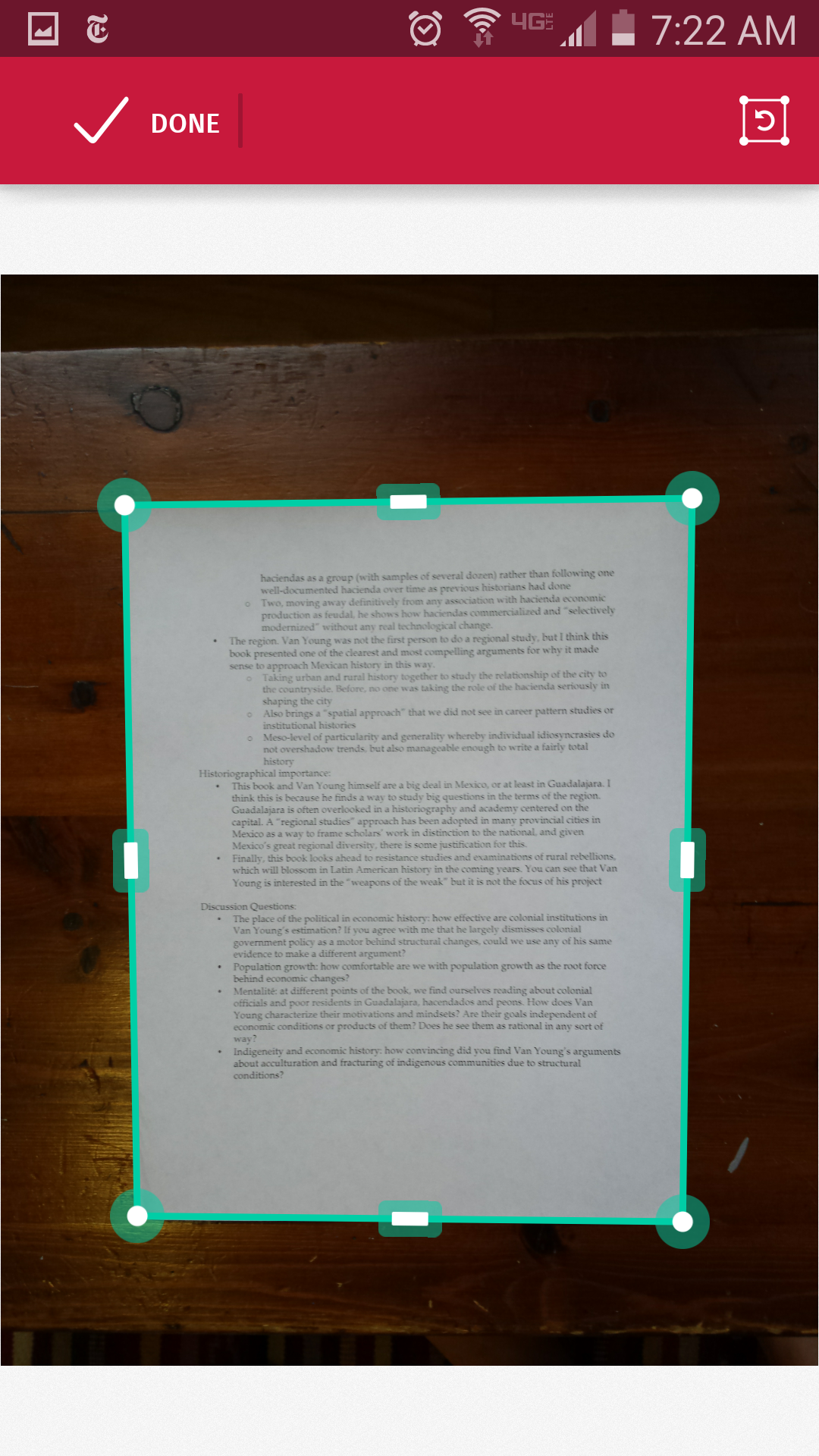
Scanbot turns your smartphone into a scanner. You hold the phone over the document, and it uses the phone’s camera to detect a document below. Based on what the phone sees, it draws a teal-colored rectangle around the edges of the document, more or less accurately.

Once it has detected the document and focused–both happen automatically–Scanbot takes a picture of the document. You don’t actually have to press a button to take the picture.

Scanbot also crops around what it thinks are the edges of the document. If you don’t like the way it was cropped, you can manually adjust the rectangle on the raw photograph.

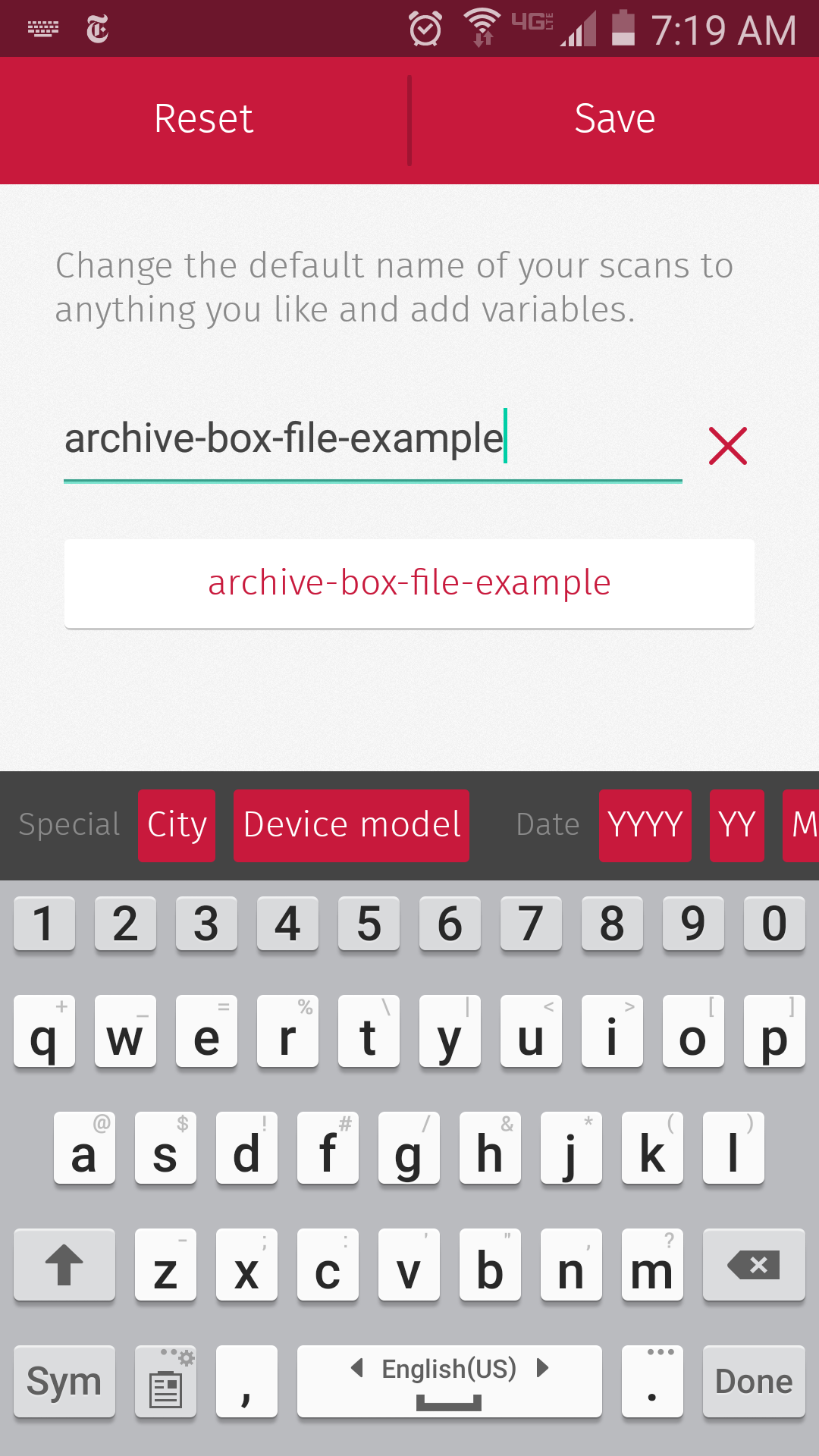
scanbot_good_crop
This shows the results of a successful auto-crop: the rectangle matches the edges of the page. The actual image saved wouldn’t include the table underneath.

You add more pictures to the file by repeating this process: swipe left to return to the camera, and take another picture of the next document.

When you are finished, Scanbot will save the series of cropped images as a PDF and upload it to the folder you want in the cloud service of your choice and, if you’ve paid for the Pro version, the PDF will be named as you designate. My file names have the name of the archive, the box number, and the file number, and a short tag suggesting what the document is.

scanbot_file_naming
Scanbot also offers “variables” to automatically name files based on the date and time.

The app works best for capturing a flat document sitting on top of a surface in a contrasting color. Sometimes in the archive, those conditions are easy to achieve. But in many cases, we are not working with a clean piece of white paper on a dark wood desk, but rather with a messy stack of brown pages inside a brown folder.

In that situation, Scanbot still works, it just takes longer to detect the document and capture the image, and you need to fix the crop job more often.

When I was photographing a white page on a stack of other white pages in a white folder, Scanbot had trouble. The rectangle shows its bad guess of where the document actually was. But it's easy to fix this by re-aligning the sides of the rectangle with the document.
When I was photographing a white page on a stack of other pages in a white folder, Scanbot had trouble. The rectangle shows its bad guess of where the document actually was. But it’s easy to fix this by re-aligning the sides of the rectangle with the document.

When photographing pages in bound volumes or even long pamphlets that do not lie flat, I would not recommend using Scanbot at all. Scanbot sees curves, and not the straight lines that it uses to find the document. The app then struggles to detect the page, frantically flashing the alternating messages “Don’t move” and “Move closer.” Particularly frustrating (and also a little funny) is the error message “No document” that appears above, well, the document you are trying to photograph. For any bound materials, the point-and-shoot will be much faster than Scanbot.

Scanbot uses a lot of battery charge. You will need to bring your phone’s charger, or better yet, a spare battery and spare battery charger, to use it for a full day in the archive. I would recommend that you turn off the OCR feature (it makes the document upload too slowly) and frequently confirm that documents are actually uploading to the cloud.

Scanbot wasn’t designed for historians in the archive, and I am not ready to abandon my real camera completely. But it is about the same speed as using a regular camera thanks to the automated features. And since it is not costing me time in the archive, the other benefits of Scanbot are hard for me to pass up. It saves me from the tedious tasks of transferring images from an SD card to the computer, putting them in the appropriate folders, rotating them, and combining the images into PDFs. I suspect that the process of re-reading my materials, and writing the dissertation, will be just a little easier because of Scanbot.

Enchiladas for LULAC, El Paso, 1935: Thoughts for International Women’s Day

One of the joys of working with historical newspapers is finding things you weren’t looking for.

Today, I came across a short article very appropriate for International Women’s Day, when we commemorate women’s struggles for political and other rights.

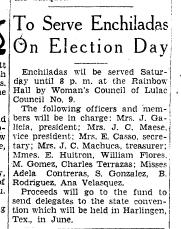
Eighty years ago, in February 1935, the El Paso Herald Post announced that women would be selling enchiladas to raise funds.

from the El Paso Herald Post, February 22, 1935, p. 13

Their cause was LULAC, the League of United Latin American Citizens, which had formed a few years before. This group was one of the first to advocate for Mexican Americans’ full inclusion in U.S. politics and society. They also denounced the violence and discrimination faced by people of Mexican descent in the Southwest.

Women participated in the organization almost from its earliest days. In fact, the El Paso LULAC Women’s Council was one of the first ones founded, and it is the oldest women’s council that still exists today.

This brief article reminds us that women’s political activism sometimes incorporates traditional women’s work, like food preparation. This group of señoras selling tasty enchiladas might not have immediately alarmed people in El Paso, but the women’s plan was to raise money to send their own delegate to a LULAC convention. Food was a means to a political end.

In fact, in the last century, throughout Latin America women’s groups leveraged traditional aspects of femininity–from domestic tasks to images of motherhood–to make political demands and support causes. Here are two examples (in Spanish) from Argentina and Chile.

These enchiladas suggest to me that this type of activism happened north of the border, too.

When were the first Mexican student associations founded?

On my first blog post last fall, I shared evidence of what I still think is the one of the earliest specifically-Mexican student clubs in the United States at Lincoln Memorial University in Harrogate, Tennessee.

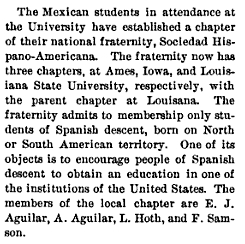
Today I found this information from 1906 suggesting that the Sociedad Hispano-Americana may have been the first Mexican student club — a fraternity, in fact — that was actually open to all students of “Spanish descent.”

From the Iowa Alumnus, Vol. III, No. 9, June 1906

The fact that this organization was founded at Louisiana State University makes sense given that many Mexican students from the Yucatán Peninsula, located in the Caribbean, attended college in the U.S. South, the easiest region for them to access.

But I am surprised that the second and third chapters were founded in Iowa.

I’ll report back when I find more information on this.

From Rensselaer to the Revolution: José Amilcar Vidal Sánchez

As the new semester begins, I am working on my dissertation proposal and preparing for my general exams. I decided to take a break today to see if I could find any new names to add to my database of Mexican students in the United States.

I started by looking in Roderic Camp’s Mexican Political Biographies, 1884-1934. Each entry includes information on an important public figure’s family, birthplace, jobs, and most importantly for me, educational background. I simply browsed until I found the case of José Amilcar Vidal Sánchez.

Vidal's portrait from the 1912 RPI Yearbook, p. 116.
Vidal’s portrait from the 1912 RPI Yearbook, p. 116.

Born in a small town in northern Chiapas in 1890, Vidal studied Civil Engineering at Rensselaer Polytechnic Institute. Some research on Ancestry.com yielded results from the RPI yearbook. I learned that he was a member of the Unión Hispánica. He graduated in 1912.

Next to his portrait was a short biographical sketch, apparently written by the yearbook editors.

Biography of José Amilcar Vidal Sánchez, 1912 RPI Yearbook, 116.

The yearbook editors drew upon already-old stereotypes of a short, lazy, siesta-prone Mexican to describe their classmate.

Notice in the final line that the editors’ valediction refers to the Mexican Revolution. In fact, upon returning to Mexico, Vidal aligned himself with the supporters of Venustiano Carranza and served as Chiapas’ delegate to the 1916 Constitutional Convention. As a civil engineer, he was appointed to several government positions in Mexico City in the 1920s and 1930s. Perhaps he was not as fond of sleeping as his classmates at RPI had believed.

I hope to find more information on Vidal in the archives. But in the meantime, his story confirms some of the patterns I’ve notice so far. One is that before 1920, many of the Mexican students in the U.S. were engineers, like Vidal. Also during this time period, most of the Mexican students who went to the U.S. were from places far from the center of the country, like Yucatán and the northern states. Chiapas, the southernmost state, might also be part of the student-sending periphery. But since Vidal is the first person from Chiapas whom I have found in my research, I will have to keep looking.

The first club for Mexican college students in the United States?

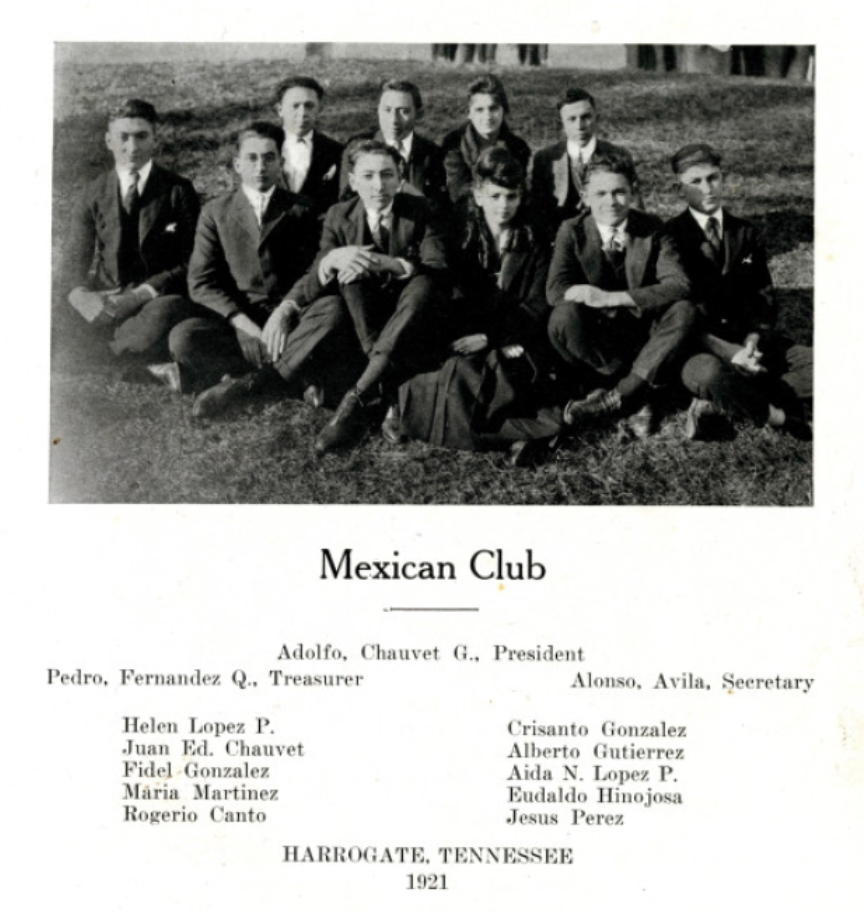
The banner for this website is a detail taken from the image below, showing the Mexican Club at Lincoln Memorial University in 1921. I found it using Ancestry.com’s collection of digitized yearbooks. I’ve been using yearbooks in my work for several months, but this image really surprised me.

Lincoln Memorial University Yearbook, 1921, p. 193.

I should say that I didn’t exactly stumble upon this yearbook. Earlier this year, I consulted a directory of all the foreign students in the United States, published in 1919, which listed nine students from Mexico attending LMU. Some of them were still there a few years later, so when I searched their names on Ancestry, I found the image of the Mexican Club they belonged to in 1921.

But there is something remarkable about this image: it’s the earliest evidence I have found for a club specifically for Mexican students at a U.S. university.

When we think of the earliest waves of Mexican migration to the United States, we don’t usually think of Tennessee. But that’s where this club was founded, at a small university in in the town of Harrogate near the Cumberland Gap.

Who were these students, and how did they get to Tennessee?

On this blog, I’ll be writing about my search for information to answer these questions about Mexican students in Tennessee and elsewhere.